# Holograms, but virtual

{% hint style="info" %}
We have plugins for Blender, Unity and Unreal Engine! Learn more about them [**here**](broken://pages/-MWj8zzUehYJ02uMgsxx)**.**
{% endhint %}

## What kind of programs can make holograms?

Generally, any 3D program that allows you to move the virtual camera inside of virtual 3D space can be used to capture holograms.

Some programs offer more control than others and have different features. The most straight forward way to capture a hologram in 3D software is by moving the camera left to right. You can even capture holograms in video games if the camera is stable enough.&#x20;

Some programs, like Autodesk 3DS Max, Autodesk Maya and Cinema4D allow more control over how the camera works and can take advantage of more advanced techniques that modify the camera's frustum.&#x20;

## How do I move the camera to capture a hologram?

The general technique for capturing holograms involves moving a camera in a straight path, from left to right. This ensures that you're capturing the scene from multiple perspectives, which when put together form <mark style="color:purple;">**a**</mark>[ <mark style="color:purple;">**light field**</mark>](#user-content-fn-1)[^1]<mark style="color:purple;">**.**</mark>&#x20;

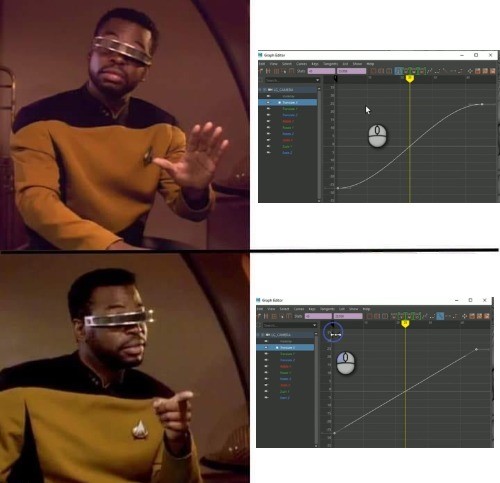
It's important to make sure that there is no easing or other animation curves on the camera. It should be moving at a constant rate from left to right. Usually this would mean that you'd need to set a keyframe with linear or constant interpolation on it. In general, you should follow the following rules when setting up your camera.&#x20;

* The camera must be set to perspective, orthographic cameras will not work.&#x20;
* The camera must be set to linear animation, and not have any easing present.&#x20;
* The camera must move in a straight line, and not along a curved path.&#x20;

<figure><img src="/files/wG5yaz32wZH0Ye8iK0R5" alt="A meme with Geordi La Forge from Star Trek the next generation, Geordi cautions against using a curved animation curve and points to using a linear animation curve instead. "><figcaption><p>If your program shows a curved animation path that usually means it's using some kind of easing, make sure the line is straight!</p></figcaption></figure>

Learn more about how to frame and position your camera here:&#x20;

{% content-ref url="/pages/-MfcfofpwoOra8COL4k0" %}
[Linear Light Field Capture](/keyconcepts/capturing-a-lightfield/linear-light-field-capture.md)
{% endcontent-ref %}

## Do holograms have to be static? Can I make interactive holograms?


You can totally make interactive holograms. Our [<mark style="color:purple;">**Unity**</mark> ](/software/index.md)and [<mark style="color:purple;">**WebXR**</mark>](/software/creator-tools/webxr.md) integrations offer the best support currently for making holograms that you can interact with using your computer mouse, [Leap Motion Controller](#user-content-fn-2)[^2], or gamepad!&#x20;

<figure><img src="/files/jyFlA5PlGeT1zefPPvKC" alt=""><figcaption><p>Here's an example of using a Leap Motion Controller with Unity to make a fun interactive physics demo</p></figcaption></figure>

[^1]: You can learn more about light fields [here](/keyconcepts/capturing-a-lightfield.md)!

[^2]: The leap motion controller is only supported on Windows with Unity or Unreal Engine currently.&#x20;


---

# Agent Instructions: Querying This Documentation

If you need additional information that is not directly available in this page, you can query the documentation dynamically by asking a question.

Perform an HTTP GET request on the current page URL with the `ask` query parameter:

```
GET https://lfdocs.lookingglassfactory.com/keyconcepts/key-concepts/holograms-but-virtual.md?ask=<question>
```

The question should be specific, self-contained, and written in natural language.
The response will contain a direct answer to the question and relevant excerpts and sources from the documentation.

Use this mechanism when the answer is not explicitly present in the current page, you need clarification or additional context, or you want to retrieve related documentation sections.